
Ant.
Write without distractions.
Simple, smart and quiet. Plain Markdown files on your disk.
Follow the tunnel
For writers
Your manuscript, nothing else
Just the page and the cursor. No toolbars, no panels.
Chapters in the sidebar, word count at the bottom.
One anthill, many chambers
A chamber for each part of your life
Your notes live in one folder, the anthill. Each chamber inside is one context: a novel, your diary, your work.
Each one with its own pins, diary and editor.
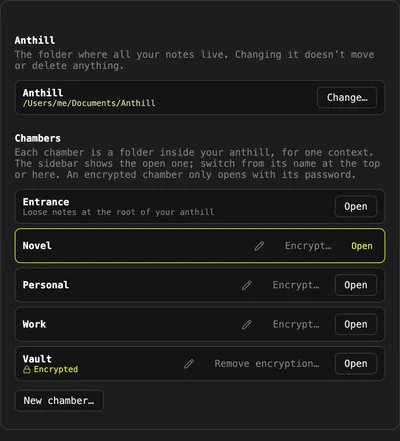
Encrypted chambers
A chamber only you can open
You can lock a chamber with a password. On your disk or in the cloud, nobody else can read it.
Forget the password and it is lost. On purpose.
For everyday notes
Ideas, lists, journals
Pin what you use most, keep a diary, paste images, check off tasks.
Your notes are files you own.
For developers
Plain text, keyboard first
- Highlighted code in dozens of languages.
- Code blocks and brackets close themselves.
- Plain files, at home in a git repo.
- Open source, MIT license.
## Deploy notes

```sh
$ pnpm version patch
$ git push --follow-tags
```

- [ ] update the changelog
Simple, but smart
Details that stay out of the way
An outline that follows you
The heading you are under lights up.
Pins
Your project on top, like pinned tabs.
An editor per chamber
A writer’s, a programmer’s, or both.
Notes that travel
Pins and options go with your notes.
Nothing gets lost
Saves as you type, never overwrites.
Find and replace
With regular expressions too.
Light as an ant
About 6 MB
No bundled browser. It opens instantly.
Hands on the keyboard
Shortcuts
- ⌘ N
- New note
- ⌘ ⇧ N
- New chamber
- ⌘ O
- Open
- ⌘ S
- Save
- ⌘ \
- Sidebar
- ⌘ ,
- Settings
- ⌘ ⇧ E
- Compile and export
- ⌘ F
- Find
All of them can be changed.
The end of the tunnel
Start writing
Free. Download it, dig your anthill and write.
A project by Agustín Rojas. Free and open source, MIT license.
Inspired by Left, the plain-text editor by Hundred Rabbits. Thank you!