/01
Subtasks
Nest tasks with two spaces per level. Move, complete, or delete a parent together with its descendants, and undo the operation as a unit.
 TuxedoTask.
A rose, a mask, and a mission: bring order to your todo.txt.
Free & open source No account required Built with Rust
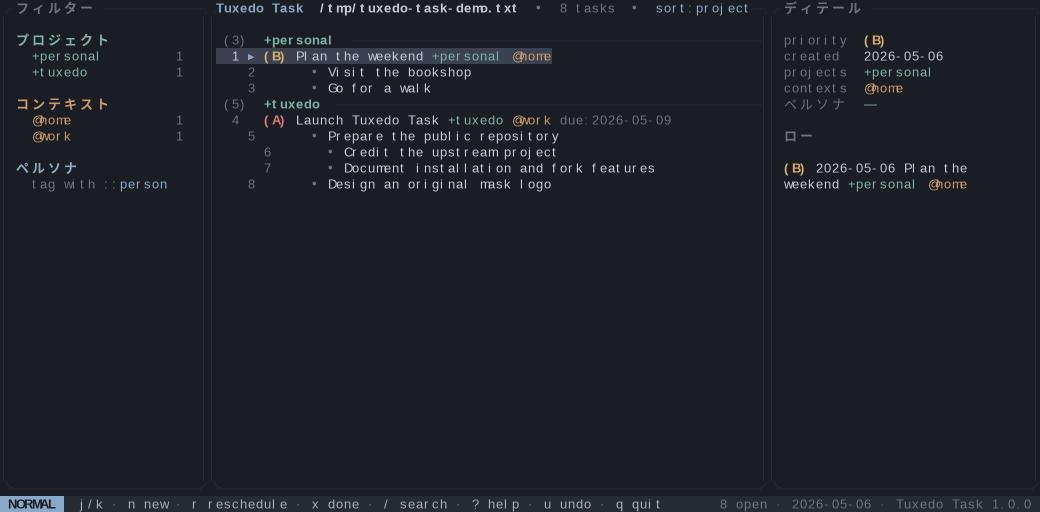
Rendered by the application itself · sample tasks · default theme
01 / Features
Additions to the original Tuxedo workflow.
Tasks, families, and projects.
Nest tasks with two spaces per level. Move, complete, or delete a parent together with its descendants, and undo the operation as a unit.
Group tasks by +project while keeping parent/subtask families together. Tasks with multiple project tags can appear in multiple groups.
Create or edit a parent and its subtasks in one dialog. Save the whole family as a single undoable change.
Click task rows and sidebar filters, navigate with the scroll wheel, and drag task text to copy. Mouse support can be disabled.
Keep the active project and context filters across restarts, separately from named saved searches.
Show or hide pane borders, adjust the outer margin, and use the refined task rows and headers alongside inherited theme support.
02 / Stay in your flow
No new system to maintain. Just a file, a few familiar keys, and a little more clarity about what comes next.
In Tuxedo Task, press n to open the add-task dialog. Type your task and confirm with Enter.
These keys run in the app. Letter shortcuts are lowercase; no Shift needed.
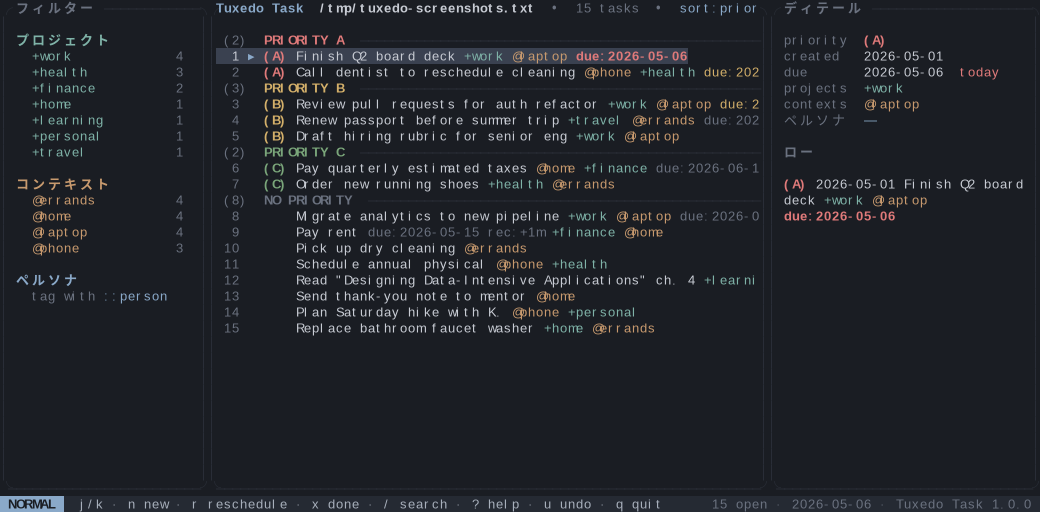
Rendered by the application itself. Your terminal, theme, and font may look different.
Good roots. New branches.
03 / Make yourself at home
Install a precompiled binary.
No Rust or Cargo required.
brew install caracolaracol/tap/tuxedotasktuxedo /path/to/todo.txtFull installation guide Windows 10 / 11 · x86-64
Per-user Setup.exe. No administrator, Rust or Cargo required.
The initial Windows installer is unsigned; SmartScreen may warn. Download from the official release and verify the SHA-256 checksum. Do not disable Windows security.
Both command names work Use tuxedo or tuxedotask. They open the same application and keep the existing task files and your configuration. Homebrew must already be available for the command above.
Prefer a portable download? ZIP / tar.gz archives remain available for your OS and CPU. The Windows installer adds optional user PATH integration and a terminal shortcut; uninstall keeps your tasks and settings. See the Windows installation guide.
brew install tuxedo installs upstream, not this fork. The Homebrew formulas conflict; choose which owns that command instead of forcing an overwrite.
A few things worth knowing
No. Tuxedo Task is an independent community fork of Tuxedo by Webstone Technologies. We preserve the original MIT license and build on the work of its contributors. Our additions include nested subtasks, family editing, project grouping, mouse interaction, and remembered filters.
Yes. Tasks remain in plain-text files. Subtasks use two leading spaces per level, a fork-specific extension: other todo.txt clients may flatten the hierarchy or strip indentation. Back up your files before switching clients. The CLI listing and JSON output do not currently expose the hierarchy.
No account, hosted backend, or database is required. Task files live on your machine. Natural-language parsing is local. Optional phone capture uses your trusted local network; the update check contacts GitHub and can be disabled with TUXEDO_NO_UPDATE_CHECK=1.
Yes: use brew install caracolaracol/tap/tuxedotask. Our tap downloads a precompiled binary, with no Rust or Cargo required. Both tuxedo and tuxedotask open the same app. In contrast, brew install tuxedo installs the upstream application. The two Homebrew formulas conflict because they both provide the tuxedo command.
A small nod to Tuxedo Mask from Sailor Moon, created by Naoko Takeuchi. Our mask is an original design. This project is not affiliated with or endorsed by Sailor Moon’s rights holders, or by the upstream maintainers.
Less managing the system. More living your life.
